Showing posts with label Globalization and Localization. Show all posts

Tuesday, June 24, 2008

Replacing Localization with Google Translate in Asp.net

Replacing Localization with Google Translate in Asp.net

Google Translate is constantly improving its Translate functionality, and moreover it is supporting lots of locale, so will it be solution for next generation asp.net web applications for atomizing translate functionality? Will Google Translate replace the localization and globalization concept in asp.net.


Example of Google Translate from English to Hindi Language


Example 1:


Example 2


Lets understand when and where solution provided by Google Translate is feasible, to implement in web application.

Advantage of using Google Translate over localization and globalization concept in asp.net

  • Google Translate is Free Service
  • No Extra Development Cost, No Translation Cost to web application development.
  • Google Translate supports following Langauges, which is lot compare to solution provided by developer.

Languages supported by google translate

Arabic, Bulgarian, Chinese(Simplified), Chinese(Traditional), Croatian, Czech, Danish, Dutch, Finnish, French, German, Greek, Hindi, Italian, Korean, Japanese, Norwegian, Polish, Romanian, Russian, Spanish, Swedish, Portuguese.

  • Google Translate, not only translate the localization resources, but it also translate the data into local language, which is the most important considerable point for choosing google translate over localization solution provided by asp.net web application.
  • Flexibility to switch between English and Local Language to get better understanding.

Disadvantages of using Google Translate over localization and globalization concept in asp.net

  • It is suitable in situation for web application which is specifically targeted to English audience, but it might require to be translated in other locales, just as extra functionality.
  • Image is not converted to Local Language.
  • Sometimes Translation changes the whole meaning of sentence, which is not acceptable depends on nature of application.


  • It displays google logo which is less preferred while developing enterprise level application.

Now depends on some of advantage and disadvantage identified by me, you can compare it with nature of your application.

Link of Interest:

Releated Links

Sunday, February 18, 2007

Ease of applying Globalization and Localization with ASP.net 2.0

I had previously written, an article explaining Localization and Globalization concept in asp.net 1.3, but with asp.net 2.0 the same generalize concept of localization and globalization can be implemented more easily.

I would suggest reader to read the previous article which help you to identify the ease of applying the concept.
http://dotnetguts.blogspot.com/2006/11/understanding-globalization-and.html

Understanding concept with Example
Step1: Create a Web Project.

Step2: Design your form.
For this example : Take 5 label controls, 4 textbox controls and 1 drop-down list control.
Place the control on form as shown in figure.


Step3: Identifying Resources that needs to be localized (Globalization Phase).
We want the output as shown in figure:


So here Resource that needs localization are

Language Name Label
Long Date Label
currency Label
Amount Label
Welcome Label (It would be same for all language, except its formatting might change, Note: you can do this easily with style-sheet concept, but as an example here I am explaining it with globalization concept.)

Now, Applying Localization to resources which needs to be localized and globalization phase. (Localization Phase begin).

Step5: Creating Resource File.
For this example i am creating resource file for French and German culture and other culture would get value from default resource file. Right click the Project in Solution Explorer and add a “asp.net folder”

Add App_GlobalResources Folder Add App_LocalResources Folder


Adding Global Resource File under App_GlobalResources Folder


Adding Local Resource File under App_LocalResources Folder

Note: While creating resource file, you should name resource file with filename.aspx.cultercode.resx

Eg:
1 For Default.aspx file, Default resource file would be Default.aspx.resx


2 For German resource file for Default.aspx would be Default.aspx.de-DE.resx


3 For French resource file for Default.aspx would be Default.aspx.fr-FR.resx


Step6: Adding code in .CS file to make it work

Adding Namespace
using System.Globalization;
using System.Drawing;
using System.Threading;

Filling Dropdown with set of languages for user-choice.
Code in Page Load Event.

if(!Page.IsPostBack)
{
//Applying Globalization to Header Text
lblWelcome.Text = Resources.GlobalResource.HeaderTitleText; lblWelcome.ForeColor = Color.FromName(Resources.GlobalResource.HeaderTitleColor);
//CultureInfo Class GetCultures gives collection of language.
foreach(CultureInfo ci in CultureInfo.GetCultures(CultureTypes.SpecificCultures))
{
//Filling the language collection into drop-downlistbox for user choice.
ddlLanguage.Items.Add(new ListItem(ci.EnglishName,ci.Name));
}
//Calling the Event when page loads for the first time.
ddlLanguage_SelectedIndexChanged(sender,e);
}


Assigning selected language value to current thread, to reflect changes.
private void ddlLanguage_SelectedIndexChanged(object sender, System.EventArgs e)
{
Thread.CurrentThread.CurrentUICulture = new CultureInfo(ddlLanguage.SelectedValue);
Thread.CurrentThread.CurrentCulture = new CultureInfo(ddlLanguage.SelectedValue);

//Applying Localization
ApplyLocalization();
ApplyUILocalization();
}


Code which requires localization value.
private void ApplyUILocalization()
{
lblLanguageName.Text = Convert.ToString( this.GetLocalResourceObject("LanguageName"));
lblLongDate.Text = Convert.ToString( this.GetLocalResourceObject("LongDate"));
lblCurrency.Text = Convert.ToString( this.GetLocalResourceObject("Currency"));
lblAmount.Text = Convert.ToString( this.GetLocalResourceObject("Amount"));
}


Code which does not requires localization.
private void ApplyLocalization()
{
//Lets Assume currency and amount to keep example simple.
double dblCurrency = 500.50;
double dblAmount = 9580000.75;

//No extra effort for localization as you see here.
txtLanguageName.Text = ddlLanguage.SelectedItem.Text;
txtLongDate.Text = DateTime.Now.ToLongDateString();
txtCurrency.Text = dblCurrency.ToString("c");
txtAmount.Text = dblAmount.ToString("n");
}


Now, run the application and select the different culture and based on selection you will get the localized display as shown in figure:

When associated resource file not available culture from Default Resource File would be shown.


how simplest syntax structure is used to perform globalization and localization.

Saturday, November 18, 2006

Understanding Globalization and Localization Concept

Understanding Globalization: Globalization is process of identifying all the localizable resources in the application, that will support multiple cultures. Ideally it is perform during design phase of an application, so that the resources always remains separate from the code.

Understanding Localization: In Localization you customize the application for new locales. This consist of translating resources that you identified during the globalization phase.

Difference between Localization and Globalization: Globalization is process of identifying how many resources needs to be localized to adopt a multiple culture support, while Localization is actual process of translating resource to a specific culture.

Understanding concept with Example
Step1: Create a Web Project.

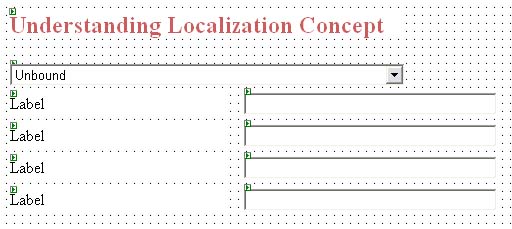
Step2: Design your form.
For this example : Take 4 label controls, 4 textbox controls and 1 drop-down list control.
Place the control on form as shown in figure.


Step3: Identifying Resources that needs to be localized (Globalization Phase).
We want the output as shown in figure:

So here Resource that needs localization are

Language Name Label
Long Date Label
currency Label
Amount Label


Now, Applying Localization to resources which needs to be localized and globalization phase. (Localization Phase begin).

Step5: Creating Resource File.
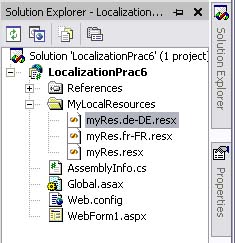
For this example i am creating resource file for French and German culture and other culture would get value from default resource file. Right click the Project in Solution Explorer and add a folder and name it. here i have named it to "MyLocalResources" you can name accordingly.

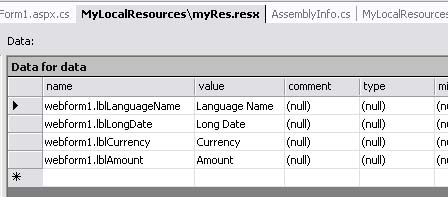
Now, Right click the Project in Solution Explorer and add a Resource File and add the content as shown in figure.

Creating Default Resource File "MyRes.resx"
(content of this resource file would be applied to resource in case resource content for language selected by user is not available.)


Creating French Resource File


Creating German Resource File


Step6: Adding code in .CS file to make it work

Adding Namespace
using System.Globalization;
using System.Threading;
using System.Resources;
using System.Reflection;

Filling Dropdown with set of languages for user-choice.
Code in Page Load Event.

if(!Page.IsPostBack)
{
//CultureInfo Class GetCultures gives collection of language.
foreach(CultureInfo ci in CultureInfo.GetCultures(CultureTypes.SpecificCultures))
{
//Filling the language collection into drop-downlistbox for user choice.
ddlLanguage.Items.Add(new ListItem(ci.EnglishName,ci.Name));
}
//Calling the Event when page loads for the first time.
ddlLanguage_SelectedIndexChanged(sender,e);
}

Assigning selected language value to current thread, to reflect changes.
private void ddlLanguage_SelectedIndexChanged(object sender, System.EventArgs e)
{
Thread.CurrentThread.CurrentUICulture = new CultureInfo(ddlLanguage.SelectedValue);
Thread.CurrentThread.CurrentCulture = new CultureInfo(ddlLanguage.SelectedValue);

//Applying Localization
ApplyLocalization();
ApplyUILocalization();
}

Code which requires localization value.
private void ApplyUILocalization()
{
ResourceManager rm = new ResourceManager("LocalizationPrac6.MyLocalResources.myRes",Assembly.GetExecutingAssembly(),null);
if(rm != null)
{
lblLanguageName.Text = rm.GetString("webform1.lblLanguageName");
lblLongDate.Text = rm.GetString("webform1.lblLongDate");
lblCurrency.Text = rm.GetString("webform1.lblCurrency");
lblAmount.Text = rm.GetString("webform1.lblAmount");
}
}

Code which does not requires localization.
private void ApplyLocalization()
{
//Lets Assume currency and amount to keep example simple.
double dblCurrency = 500.50;
double dblAmount = 9580000.75;

//No extra effort for localization as you see here.
txtLangName.Text = ddlLanguage.SelectedItem.Text;
txtLongDate.Text = DateTime.Now.ToLongDateString();
txtCurrency.Text = dblCurrency.ToString("c");
txtAmount.Text = dblAmount.ToString("n");
}


Now, run the application and select the different culture and based on selection you will get the localized display as shown in figure:

When associated resource file not available culture from Default Resource File would be shown.


Selecting French Culture

Selecting German Culture

Most Recent Post

Subscribe Blog via Email

Enter your email address:


Disclaimers:We have tried hard to provide accurate information, as a user, you agree that you bear sole responsibility for your own decisions to use any programs, documents, source code, tips, articles or any other information provided on this Blog.
Page copy protected against web site content infringement by Copyscape